The Nervous System for AI
A high-performance, modular, local-first AI orchestration library written in Rust.
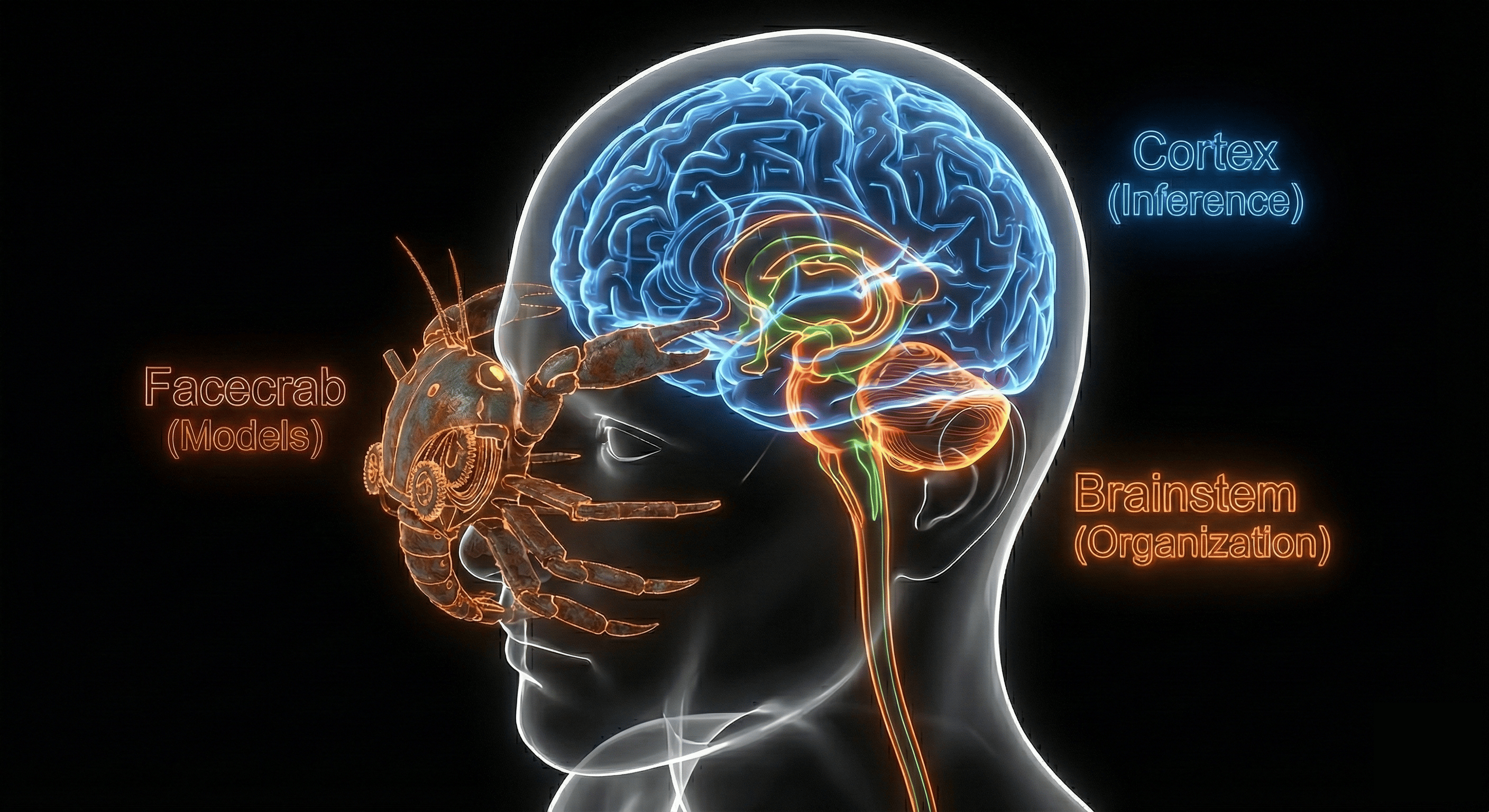
Local-First Intelligence
Why Local?
In the age of Cloud AI, local execution offers absolute privacy, zero latency, and offline reliability. Your data never leaves your machine, and your intelligence isn't gated by a subscription or an internet connection.
The Difference
Unlike API-based services (OpenAI, Anthropic) which process data on remote servers, Rusty-Genius is built for on-device orchestration. While other options exist for remote AI usage, this library focuses exclusively on the unique challenges and performance requirements of local inference.
Architecture
Crate Cortex
The Muscle (Inference Engine). Handles KV caching, token streaming, and
logic processing. Wraps llama.cpp for local execution or uses stubs for
testing.
Crate Brainstem
The Orchestrator. The central event loop that manages state, delegates asset retrieval, and controls the lifecycle (TTL) of the inference engine.
Crate Facecrab
The Supplier. An autonomous asset authority. Resolves HuggingFace paths,
manages the local registry, and downloads models via surf/smol.
Command Line Usage
The ogenius CLI provides an interactive
chat REPL and an OpenAI-compatible API server, with automatic model downloading from Huggingface.
Quick Install
# Standard install (CPU only)
cargo install ogenius

# Install with Metal (macOS)
brew install cmake
cargo install ogenius --features metal

# Install with CUDA (cross-platform)
cargo install ogenius --features cuda

# Install with Vulkan (cross-platform)
cargo install ogenius --features vulkan
Basic Usage
# Download a model
ogenius download Qwen/Qwen2.5-1.5B-Instruct

# Start interactive chat
ogenius chat --model Qwen/Qwen2.5-1.5B-Instruct

# Run the API & Web Server (defaults to port 8080)
ogenius serve --model Qwen/Qwen2.5-1.5B-Instruct
Library Usage
Add Rusty-Genius to your project's
Cargo.toml:
[dependencies]
rusty-genius = { version = "0.1.2", features = ["metal"] }
or use:
cargo add rusty-genius --features metalConfiguration
Control behavior via environment variables or manifest files:
| Variable | Description |
|---|---|
| GENIUS_HOME | Base config dir (~/.config/rusty-genius) |
| GENIUS_CACHE | Model storage & dynamic registry path |
manifest.toml
Static, user-editable file in the config directory to extend the built-in model list.
registry.toml
Dynamically updated index in the cache directory tracking all downloaded models.
Extension API
Extend the registry by creating
manifest.toml in your home directory.
[[models]]
name = "my-local-model"
repo = "Org/Repo-GGUF"
filename = "model.Q4_K_M.gguf"
quantization = "Q4_K_M"
Try It Out
Run these commands in the terminal to test the crates locally:
1. Test Asset Downloader
cargo run -p facecrab --example downloader2. Test Local Inference
Run the chat example with your preferred hardware acceleration:
cargo run -p rusty-genius --example basic_chat --features metalcargo run -p rusty-genius --example basic_chat --features cudaUsage
Initialize the orchestrator, download a model, and start chatting:
use rusty_genius::Orchestrator;
use rusty_genius::core::protocol::{AssetEvent, BrainstemInput, BrainstemOutput, InferenceEvent};
use futures::{StreamExt, sink::SinkExt, channel::mpsc};

#[async_std::main]
async fn main() -> Result<(), Box<dyn std::error::Error>> {
    // 1. Core orchestration setup
    let mut genius = Orchestrator::new().await?;
    let (mut input, rx) = mpsc::channel(100);
    let (tx, mut output) = mpsc::channel(100);

    async_std::task::spawn(async move {
        if let Err(e) = genius.run(rx, tx).await {
            eprintln!("Orchestrator error: {}", e);
        }
    });

    // 2. Select model (downloads and verifies automatically)
    input.send(BrainstemInput::LoadModel(
        "tiny-model".into()
    )).await?;

    // 3. Submit prompt
    input.send(BrainstemInput::Infer {
        prompt: "Once upon a time...".into(),
        config: Default::default(),
    }).await?;

    // 4. Stream results
    while let Some(msg) = output.next().await {
        match msg {
            BrainstemOutput::Asset(a) => match a {
                AssetEvent::Complete(path) => println!("Model ready at: {}", path),
                AssetEvent::Error(e) => eprintln!("Download error: {}", e),
                _ => {}
            },
            BrainstemOutput::Event(e) => match e {
                InferenceEvent::Content(c) => print!("{}", c),
                InferenceEvent::Complete => break,
                _ => {}
            },
            BrainstemOutput::Error(err) => {
                eprintln!("Error: {}", err);
                break;
            }
        }
    }

    Ok(())
}
Inside the Cranium
Internal Crates
- rusty-genius-cortex - Inference engine
- rusty-genius-stem - Orchestration
- facecrab - Model asset management
Key Dependencies
- llama-cpp-2 - llama.cpp bindings
- async-std - async runtime
- surf - http client (async)
OS Requirements
Rusty-Genius leverages hardware acceleration via
llama-cpp-2. Requirements vary by platform and GPU availability.
macOS
xcode-select --install and
brew install cmake
Apple Silicon (M1/M2/M3)
- • Native Metal acceleration (Default)
- • Optimized via ARM NEON and Accelerate
- • Feature:
features = ["metal"]
Intel Mac
- • CPU-only or Accelerate framework
- • Uses AMX/AVX2 instructions where available
Linux
apt install build-essential cmake libclang-dev
NVIDIA (CUDA)
- • Requires CUDA Toolkit 11.x/12.x
- • Feature:
features = ["cuda"]
AMD (ROCm)
- • Requires ROCm stack / hipBLAS
- • Feature:
features = ["hipblas"]
Intel / Generic GPU
- • Requires Vulkan SDK
- • Feature:
features = ["vulkan"]
Windows
Native (MSVC)
- • Supports
cudaandvulkanbackends - • Ensure
LIBCLANG_PATHis in environment
WSL2 (Recommended)
- • Best performance and compatibility
- • WSL2 GPU Passthrough Guide